Introduction
Here we go again — but this time it’s a bug story: the kind that starts with “that’s weird” and ends, a few days later, with a pull request merged into a project used by millions.
I’ve been building hve-video-director, my little video-production pipeline, and a big part of it records the browser through Puppeteer’s page.screencast() — often via the Chrome DevTools MCP server, which wraps that exact API. It worked, except the videos came out in slow motion: a 5-second clock took a lazy ~12 seconds to play back.
The puzzling part? The slow-motion factor was never the same twice — a gentle ~1.2× on my Mac, a brutal ~2.6× in the original report. Same code, wildly different numbers. That’s the inconsistency that means you don’t actually understand the bug yet. Let me walk you through it.
What is Puppeteer?
If you haven’t met it: Puppeteer is a Node.js library, maintained by the Chrome team, for driving a real browser from code. It’s the workhorse behind a huge slice of browser automation — scraping, PDF generation, end-to-end testing, screenshots. The official docs put it like this:
Puppeteer is a JavaScript library which provides a high-level API to control Chrome or Firefox over the DevTools Protocol or WebDriver BiDi.
– Source: pptr.dev
One of its handier tricks is page.screencast(): aim it at a page and it records a video of everything that happens. That’s the feature this whole story is about — and the one that was quietly broken.
The symptom
page.screencast() should be real time in, real time out. Instead the timeline was stretched — every frame present, nothing corrupted, just played too slowly. I ran the same recording across a few setups:
| Environment | capture rate | unfixed (fps · stretch) | fixed |
|---|---|---|---|
| macOS · headless · ffmpeg 8.1 | ~30 fps | 25 fps · 1.19× | 30 fps · 0.99× |
| WSL2 · local Chrome (WSLg) · ffmpeg 4.4 | ~31 fps | 25 fps · 1.24× | 30 fps · ~1.0× |
| Original report (chrome-devtools-mcp) | ~53–65 fps | 25 fps · 2.1× – 2.6× | — |
Two facts jump out: the output fps is 25 everywhere (Puppeteer’s default is supposed to be 30), and the stretch grows with the capture rate. Keep both in your pocket — they are the whole story. (It surfaced through chrome-devtools-mcp, which calls page.screencast() unchanged: chrome-devtools-mcp#2204.)
How it works, quickly
Before squashing anything, the mental model — it’s short:
- Chrome streams
Page.screencastFrameevents (PNG +timestamp) over the Chrome DevTools Protocol. - Puppeteer acks every frame before the next arrives, so the capture rate is whatever your machine can ack — ~25–31 fps for me, ~53–65 fps in the report.
- Those PNGs are piped into ffmpeg and muxed to WebM/VP9 at
DEFAULT_FPS = 30.
So time can break in two places: the ffmpeg invocation and the frame-duplication math. Both were broken — and they were hiding each other.
Bug #1: a misplaced ffmpeg flag
ffmpeg cares about argument order: input options go before the -i they describe, output options after. The -framerate flag is an input option — but it sat after -i pipe:0:
| |
So ffmpeg ignored it, the image2pipe demuxer fell back to its default 25 fps, and meanwhile Puppeteer duplicated frames for a 30 fps timeline — a flat 30 / 25 = 1.2× stretch, baked into every recording. The fix is almost insulting: move the flag in front of -i.
| |
That explains the 25 and the constant 1.2× on my Mac. Good ! But a constant 1.2× can’t explain the 2.6× from the report — the number moves with the capture rate, so there’s a second, more interesting bug.
Bug #2: rounding, one interval at a time
To turn a variable-rate capture into a constant-rate video, Puppeteer duplicates each frame to fill the gap to the next one. The old maths rounded per interval:
| |
Fine at or below the target fps; it falls apart above it. Capture at 60 fps with a 30 fps target, and every ~1/60 s gap computes round(30 × 1/60) = round(0.5) = 1 — one frame every interval, so you write ~60 frames for one second of 30 fps video. The count tracks the capture rate, not the target. Worse, at 120 fps it’s round(0.25) = 0 — every frame dropped:
| Captured at | Old round(fps · Δt) | Frames for 1s | New cumulative |
|---|---|---|---|
| 30 fps (= target) | round(30 · 1/30) = 1 | ~30 ✓ | ~30 ✓ |
| 60 fps | round(30 · 1/60) = 1 | ~60 ✗ | ~30 ✓ |
| 120 fps | round(30 · 1/120) = 0 | ~0 ✗ | ~30 ✓ |
The fix stops rounding each interval in isolation and differences a rounded cumulative position on a constant-fps grid anchored at the first frame:
| |
| |
Because each end becomes the next start, the rounding errors telescope away: the total is always round(fps × duration), whatever the capture rate.
ℹ️ The transferable lesson: when you accumulate a rounded quantity in a loop, round the running total, not each step — otherwise the error grows with every step. Audio resampling, animation timing, progress bars, billing: same trap.
The one relationship that explains everything
Here’s the payoff — the single law hiding under all those messy numbers:
Playback stretch ≈
capture_fps / 25before the fix, ≈1.0×after.
My Mac captured ~30 fps → 30 / 25 ≈ 1.2×. The reporter’s machine captured ~53–65 fps → ≈ 2.1× – 2.6×. Two bugs compounding: Bug #1 pinned the denominator at 25, Bug #2 inflated the numerator with the capture rate. One relationship, every reported number explained. That is when a bug stops being annoying and starts being satisfying !
Proving it, honestly
I added a browser-free unit test for countFrames: it checks the total stays within one frame of fps × duration for capture rates from 24 → 120 fps, and fails if you revert to the old per-interval formula — fail-before, pass-after. npm run unit --workspace puppeteer-core → 154/154 pass.
I’ll be straight about the rest: I did not run the full browser screencast.test.ts suite locally — I left that to CI. End-to-end I checked manually on macOS: a ~12-second window went from 14.60s / 1.19× / 25 fps to 12.03s / ~0.99× / 30 fps.
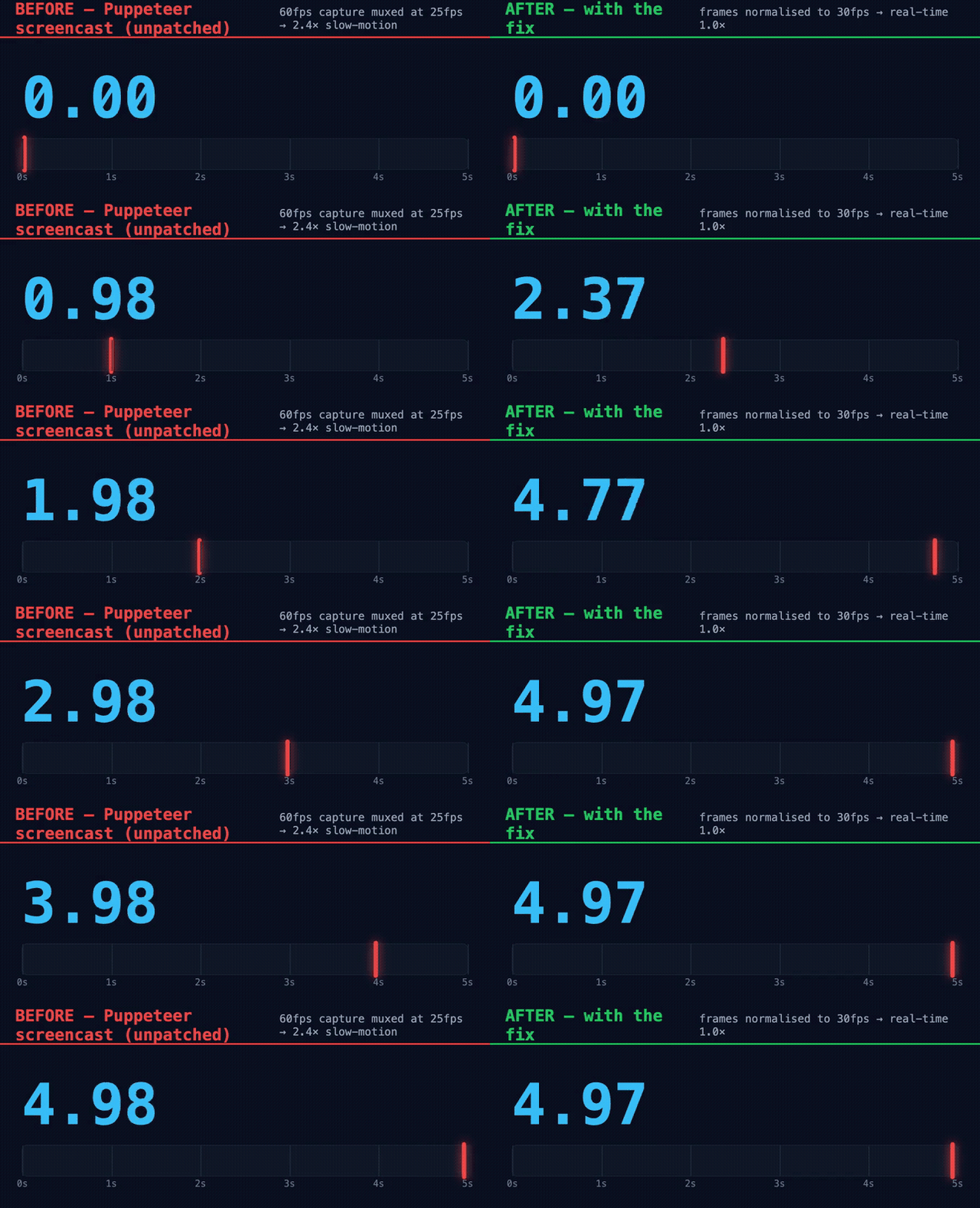
Before vs after. ⚠️ A controlled reconstruction — deterministic 60fps frames muxed through the real before/after ScreenRecorder logic, not a live capture (my hardware caps ~30fps). The fix itself is proven by the unit test.
Wrapping up
Two bugs, two files, 106 lines:
- ffmpeg argument order is load-bearing —
-framerateafter-iis silently ignored, so the demuxer falls back to 25 fps. - Don’t round inside the loop — difference a rounded cumulative position so the error telescopes away instead of tracking the capture rate.
- One good model beats ten measurements — the messy, irreproducible stretch factors all collapsed into
stretch ≈ capture_fps / 25.
No public API or option changed; page.screencast() output is simply correct now. The fix is merged: puppeteer/puppeteer#15112, closing #15111. My first contribution to Puppeteer 🎉 — found while building hve-video-director, and a nice reminder of why I love working in the open.
That’s all folks! If you record browsers with Puppeteer, upgrade and enjoy your screencasts at the right speed.
Cheers!